
Annova PODS Migration Platform
Pipeline data migrations, with every record accounted for
Annova PODS Migration Platform moves pipeline data between PODS (Pipeline Open Data Standard) versions, Pipeline Referencing and the Utility Network. It finds every schema drift before data moves, records every mapping decision, reconciles every row and lets you trace any record back to its source.
- Pipeline Open Data Standard
- PODS 5.x · 6.x · 7
- Pipeline Referencing (APR)
- Utility Network
- Lineage for every record

Every PODS migration is a high-risk, one-off project
Rebuilt every time.
Each migration starts from scratch, with new scripts and new spreadsheets.
Schemas drift.
Every operator’s database differs from the standard: renamed fields, local codes, extra columns.
No audit trail.
Mapping decisions sit in spreadsheets and email. Nobody can show who decided what.
Records go missing.
Rows are dropped silently. Problems surface after go-live, not before.
One platform that makes pipeline data migrations predictable, traceable and repeatable
Version-aware rule packs
Rules are built once per version pair and reused on every project.
Decisions people approve
Evidence-based suggestions, with each approval recorded.
Controlled, reconciled runs
Nothing runs until every column and field is accounted for.
Pipeline QA and lineage
Route-aware checks and a trace for every record.
Rules packaged once for each version pair
Upgrade
- PODS 5.x → PODS 6.x
- PODS 5.x → PODS 7 + APR
- PODS 6.x → PODS 7 + APR
- PODS 6.x → PODS 7 Utility Network
- PODS 7 → PODS 7 Utility Network
Cross-model
- APDM → PODS 7 + APR
- UPDM → PODS 7 Utility Network
- PODS 6.x → Esri UPDM
- Custom GIS or RDBMS → PODS 7
Reverse and extract
- PODS 7 → PODS 6.x, with every loss declared
- PODS 6.x → a custom target model
New model? Import its schema and the platform drafts the rules. See how.
Six steps from source database to trusted result
Discover
Detects the data model and version, compares the schema field by field, and flags missing, renamed and extra columns with row counts and sample values.
Decide
Ranked candidates with confidence and evidence for renamed fields, unknown codes and extension columns. Every decision records who made it and when.
Plan
Nothing runs until every source column is mapped or deliberately ignored and every required field has a rule. Plans are versioned and hashed.
Migrate
Deterministic, repeatable runs. Every row is loaded, filtered or rejected with a reason, and route lengths are compared source to target.
Validate
Pipeline-aware checks after every load: required fields, code values, references, measure ranges, gaps, overlaps and duplicate fittings.
Trace
Source and migrated data side by side, full lineage for every migrated record, and exactly why a record was rejected.
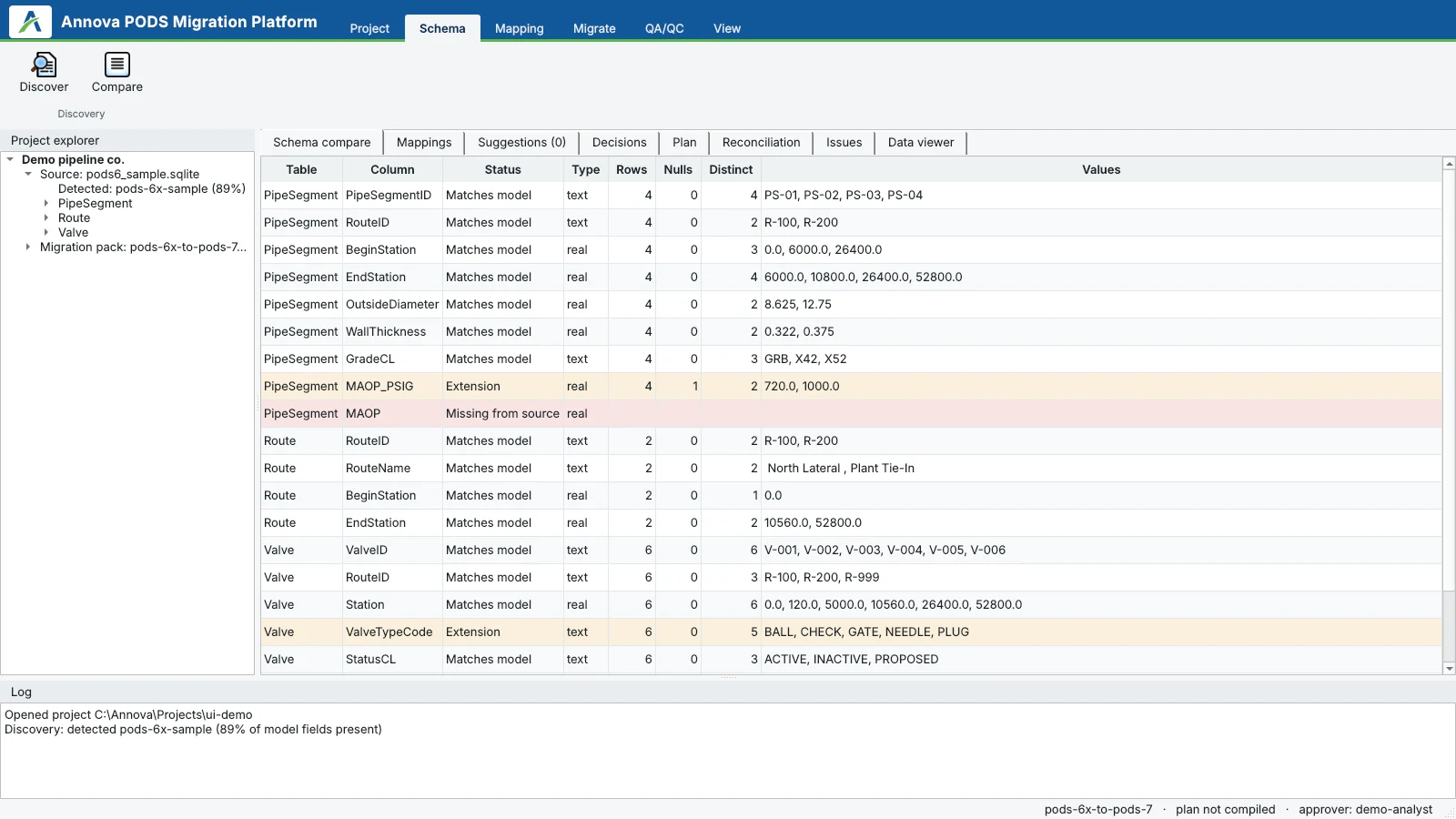
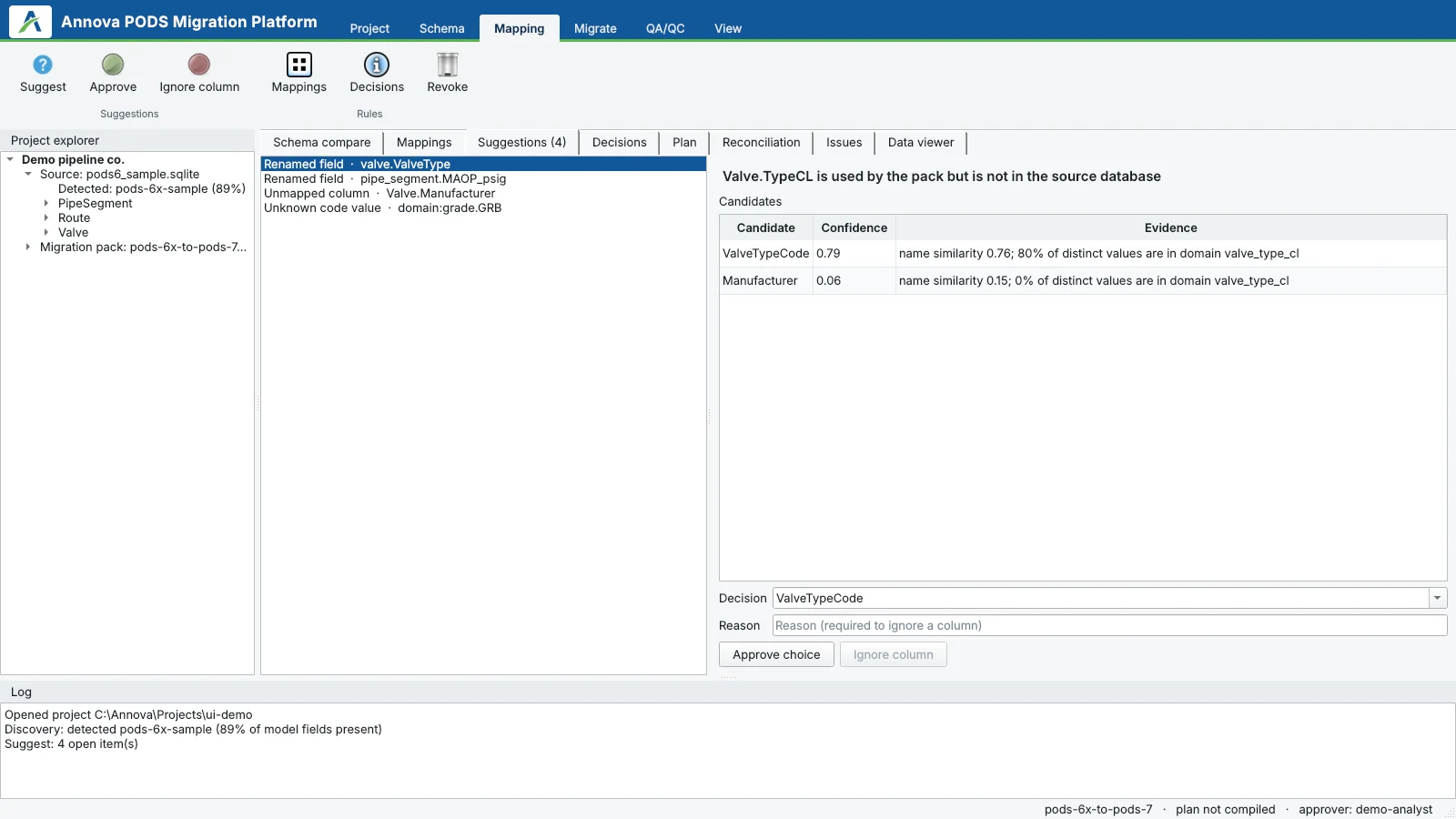
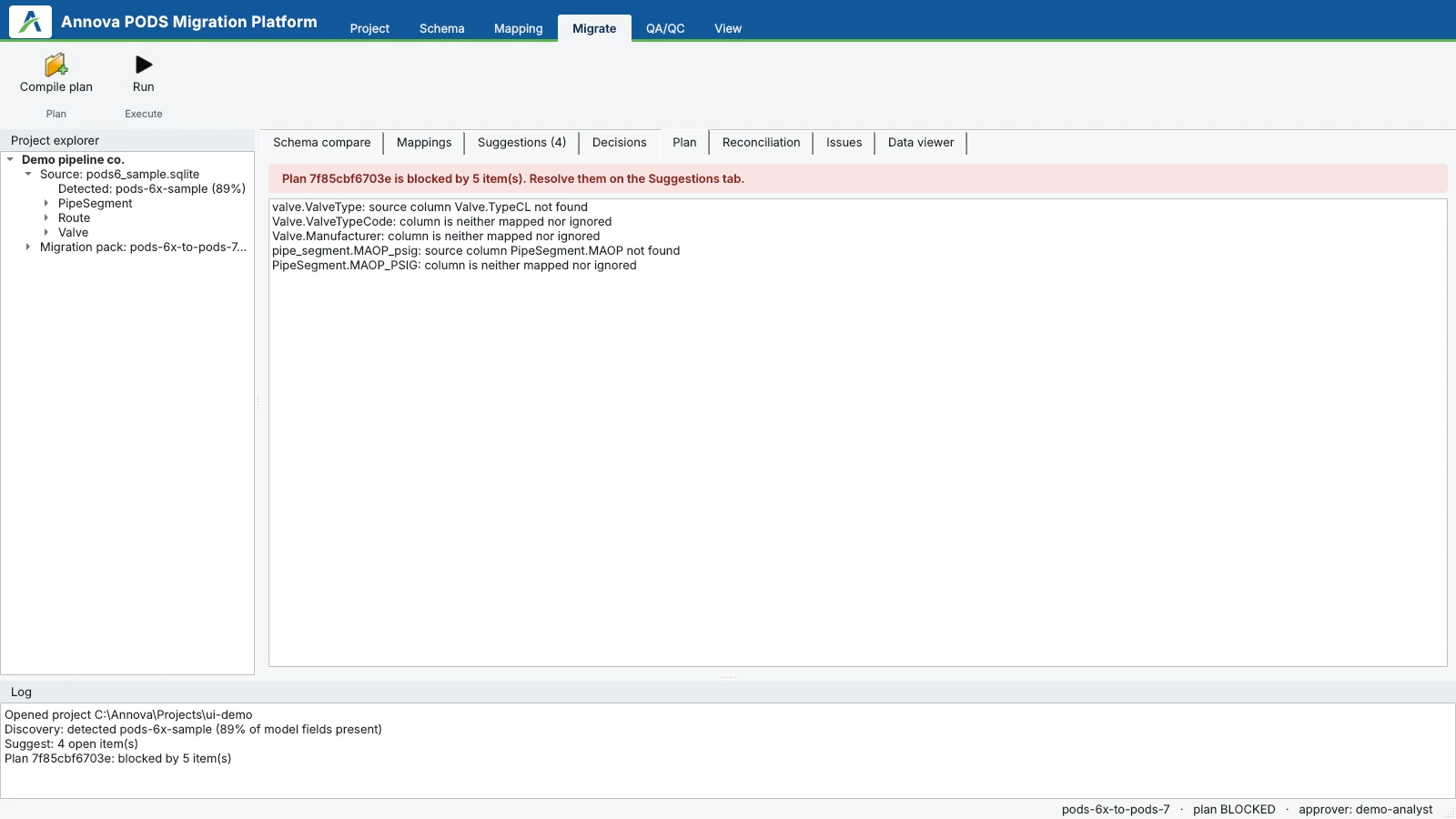
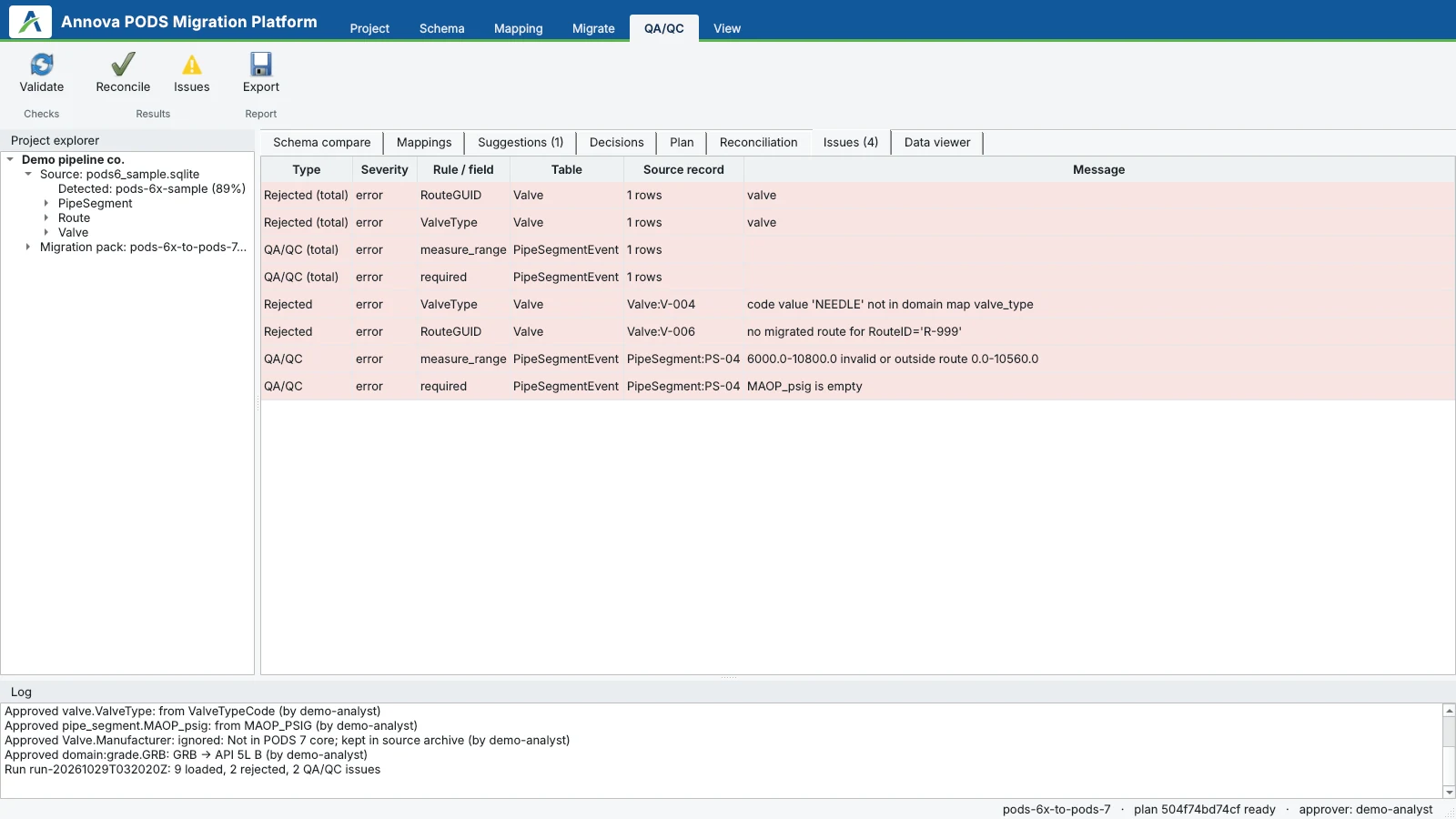
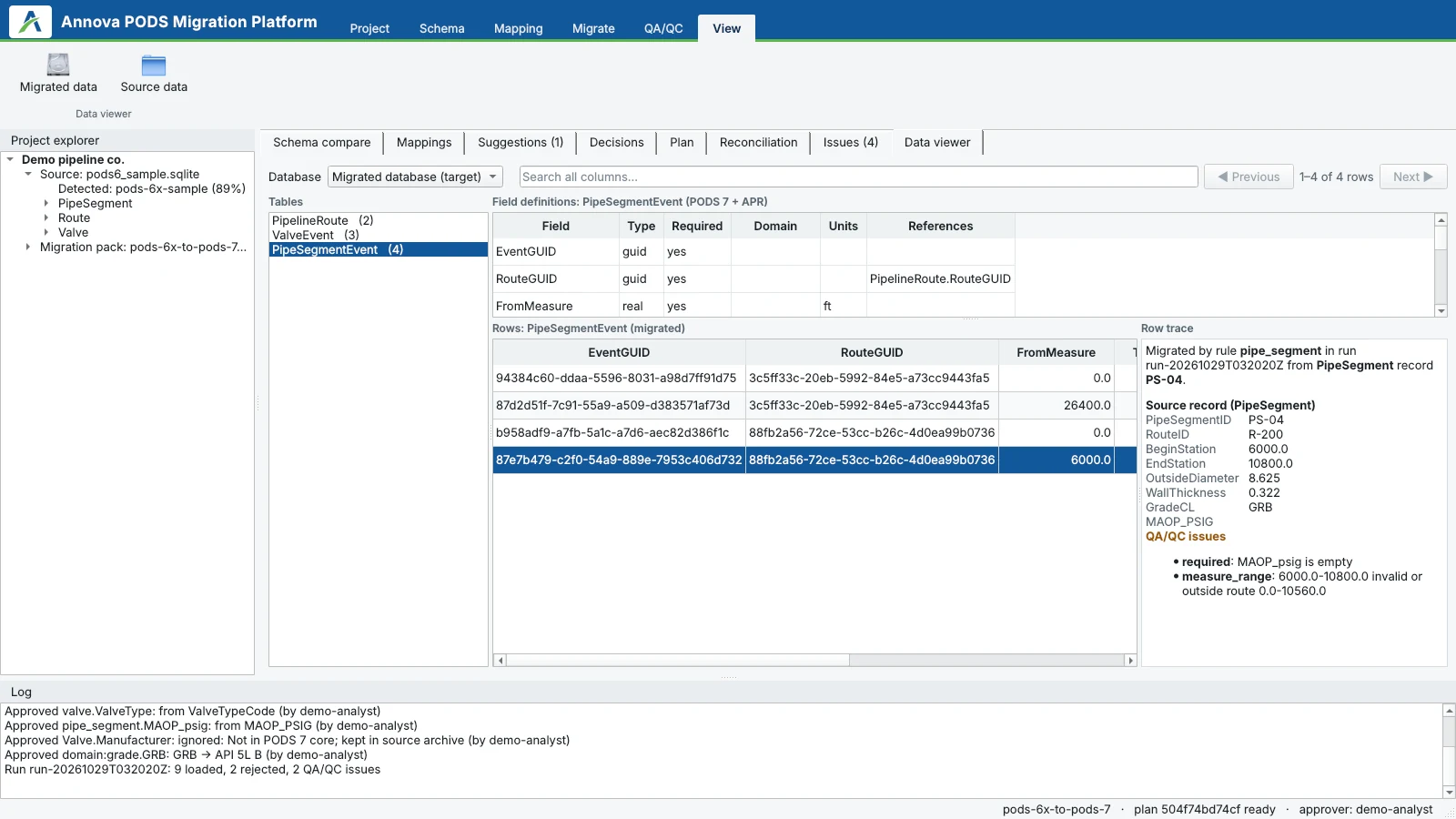
See Annova PODS Migration Platform in action
Enterprise-scale data, on a laptop
records migrated, checked and reconciled in one run
end to end, on a standard 16 GB laptop
summary report, with full detail kept in the database
Progress tracking and safe cancel: a cancelled run never leaves a half-loaded database.
Measured on synthetic test data.
From a schema file to draft rules in minutes
- Import SQL Server, Oracle and Esri geodatabase schemas
- Rules are drafted with confidence scores for your team to review
- Shown: PODS 6 → Esri UPDM with Pipeline Referencing

Predictable migrations, every time
Faster projects
Rule packs are reused across projects instead of rebuilt for every migration.
Lower risk
Nothing moves unless it is accounted for. Problems are found before go-live.
Audit-ready
Approvals, lineage and reconciliation for every record, ready for regulators and auditors.
One platform instead of scripts, spreadsheets and services
| Capability | Annova | General ETL tools | Utility Network migration tools | Consulting accelerators |
|---|---|---|---|---|
| Version-aware PODS rule packs | Yes | No | No | Partial |
| Schema drift detection and suggestions | Yes | No | Partial | Partial |
| Approval trail for every decision | Yes | No | No | No |
| Blocks until every row is accounted for | Yes | No | No | Partial |
| Record-level lineage | Yes | Partial | No | Partial |
| Pipeline QA/QC: measures, gaps, overlaps | Yes | Partial | Partial | Partial |
| Reusable product, not a one-off project | Yes | Yes | Yes | No |
See it on your own data
Schema assessment
We run Discover on a copy of your database and review the drift report with you.
Pilot migration
We migrate a representative extract end to end, with reconciliation and QA.
Production and handover
Full migration, sign-off reports, and the rule pack handed to your team.
Who it’s for
- Pipeline operators moving from PODS 5.x or 6.x to PODS 7, APR or the Utility Network
- Operators on APDM, UPDM or a custom GIS or RDBMS model
- GIS service partners who deliver pipeline data migrations and need a repeatable, auditable process
Prefer a done-for-you migration?
Our GIS Data Conversion & Migration and Utility Network Modeling teams can run the platform for you.
Frequently asked questions
What is PODS?
PODS stands for Pipeline Open Data Standard. It is the open data model that oil and gas pipeline operators use to store pipeline assets, routes and inspection data in GIS and relational databases. It is maintained by the PODS Association, and versions include PODS 5.x, 6.x and PODS 7.
Which migration paths does it support?
Upgrades from PODS 5.x to PODS 6.x, PODS 5.x or 6.x to PODS 7 with APR, and PODS 6.x or PODS 7 to the PODS 7 Utility Network. Cross-model paths from APDM to PODS 7 with APR, UPDM to the PODS 7 Utility Network, PODS 6.x to Esri UPDM, and custom GIS or RDBMS to PODS 7. Reverse paths from PODS 7 to PODS 6.x, with every loss declared, and PODS 6.x to a custom target model.
Our database is not standard PODS. Will it still work?
Yes. Discover compares your schema with the standard field by field and flags renamed, missing and extra columns and unknown codes. The platform suggests fixes with confidence and evidence, and a person approves each one.
What happens to rows that cannot be migrated?
Nothing is dropped silently. A plan cannot run until every source column is mapped or deliberately ignored and every required field has a rule. After the run, every row is loaded, filtered or rejected with a reason, and you can see exactly why.
Can it migrate to a model that is not listed?
Yes. Import a SQL Server, Oracle or Esri geodatabase schema and the platform drafts the rules with confidence scores for your team to review.
How much data can it handle?
In testing on synthetic data it migrated, checked and reconciled 2 million records in one run in about 93 seconds on a standard 16 GB laptop. A cancelled run never leaves a half-loaded database.
Is the result audit-ready?
Yes. Every decision records who approved it and when, every record has full lineage back to its source, and reconciliation covers every row.
How do we get started?
We run Discover on a copy of your database and review the drift report with you. Then we migrate a representative extract end to end, with reconciliation and QA, before the full migration and handover of the rule pack to your team.
Migrate with confidence
Send us a copy of your pipeline database. We’ll run Discover and walk you through the drift report.